3ICE • Open Tech Support. Warcraft III World Editor tutorials and map making help. The official download place for 3ICE's maps. About 3ICE: 3ice.hu/blog/about
Type in your router's password (Usually "admin") If it didn't work, you can find your password here: http://www.3ice.hu/tool/dpl/
Find the portforwarding section inside the router options. (Should be under Gaming or Programs or Special Applications or NAT)
Use the following values to create a new forwarding rule: Port: 6112, Type: Both (TCP and UDP), Name: war3, IP (if required): The last digit of your local IP. If your router is so old it doesn't have a Both setting for type, then select UDP and pray that it works.
The end!
Stop reading this tutorial if you can host now. Continue with the alternative methods below if you still can't.
This method takes the most time. Before starting, obtain the login password of your router! (portforward.com will tell you in most cases, but if it doesn't work you can use my DPL list or ask your parents if they have changed the password)
This will only work if you have a router and the router is what's blocking you from being able to host. First of all you have to find two hardware boxes near your computer: a router and a modem. Before starting, obtain the necessary information for setting up an internet connection! (The username and password your ISP gave you upon registering with them)
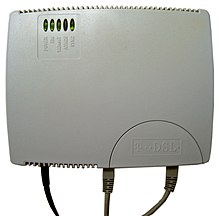
Find your Router and your Modem. (They are pretty similar, but it is important to differentiate them. Use the images above for reference)
Unplug all cables from both, but leave the telephone cable in your Modem untouched.(This will disconnect you from the internet, but don't worry about it. You will be online again, very soon)
Take a cable and connect your Modem to your PC with it. (Yes, leaving the router out)
Now your internet should work again. (If not, you will have to set up your internet connection using the username and password you collected earlier.)
If you have a firewall, turn it off. (Or if you can, add War3 to the exception list)
Now you should be able to host! Have fun!
When done playing, don't forget to turn your firewall on again!